WiFi Module & LAN Module (Ethernet Adapter)
923 WiFi/Ethernet
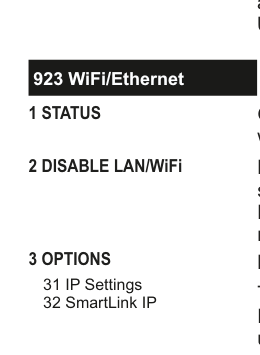
Menu tree diagram for WiFi/Ethernet (923):
923 WiFi/Ethernet1 STATUS2 DISABLE LAN/WiFi3 OPTIONS31 IP Settings32 SmartLink IP
1 Status
Gives a quick overview of real time conditions for instance whether the LAN (Local Area Network) or WiFi is okay.
2 Disable LAN/WiFi
By default the LAN and WiFi modules are disabled. This saves power. As soon as you attempt to program the LAN Module (or Ethernet Adapter as it is sometimes called) or WiFi module you will be prompted to enable it.
3 Options
31 IP Settings
IP Settings has five sections.
The first is DHCP Enabled. DHCP is shorthand for Dynamic Host Configuration Protocol. It is an auto-configuration protocol used on IP networks. When it is enabled, you do not have to configure the other four sections i.e. the IP Address, Subnet Mask, Gateway and DNS Server.
We strongly recommend that you leave DHCP Enabled set to YES unless you are installing the system on a site where the IT specialist may want these configured in a particular way.
32 SmartLink IP
SmartLink IP has three sections; Enabled, Encryption and Password. However, we recommend that you contact HKC if you want to use this section.
4 Scan for WiFi
Go to Scan for WiFi and press YES. The system now searches for the strongest WiFi signals in your vicinity up to a maximum of 6 networks. Scroll through the list of networks by pressing NEXT until you see the one you want to connect to, then press YES. You will then be prompted to input the security code of the WiFi hub in question.
You need to be careful at this point since security codes tend to be case sensitive. You may need to refer to page 8 to see how to input upper and lower case characters.
Once connected the system will remember the security code.
The GSM-WiFi card combines a GSM and WiFi communication path in one unit. In general, the WiFi path is used most of the time. If the WiFi path in unavailable, the unit switches over to the GSM path as a backup.
When using a GSM-WiFi Dual Path unit, make sure to enable both the GSM and WiFi capabilities of the device.
Where you use the GSM-WiFi unit as a traditional dialler (i.e. not IP Monitoring) the signalling is carried out through the GSM voice channel alone and not the WiFi path.
You cannot have the LAN and WiFi cards plugged-in together. You must pick one type of card. The system can auto-detect which card you are using and present the appropriate menu.