GSM/GPRS Module
922 GSM/GPRS
If you did not select Digi Dialer but scrolled and selected the next menu instead it would be GSM/GPRS. This is where you can program specific GSM configurations.
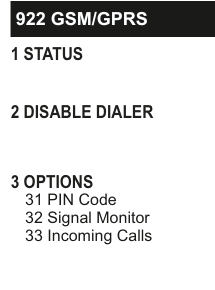
Menu tree diagram for the GSM/GPRS module (922):
922 GSM/GPRS1 STATUS2 DISABLE DIALER3 OPTIONS31 PIN Code32 Signal Monitor33 Incoming Calls
1 Status
Gives a quick overview of real time conditions for instance whether the GSM network is okay.
2 Disable Dialer
By default the GSM unit is disabled. This saves power. As soon as you attempt to program the GSM unit you will be prompted to enable it.
3 Options
31 PIN Code
There is no need to go to the PIN Code section on a GSM-WiFi module because there is a pre-fitted SIM card. However, if you want to use an alternative SIM on a GSM-Q, go to PIN Code to key-in the new PIN number.
32 Signal Monitor
The Signal Monitor menu has three sections:
Monitor Signal will flag a fault in the event of a GSM network failure.

Menu tree diagram for the GSM/GPRS options continued:
922 GSM/GPRS contd.3 OPTIONS contd.31 PIN Code32 Signal Monitor33 Incoming Calls
You can delay the notification of a fault by going to the Fault Delay menu and keying-in a delay time in seconds. Useful in areas of poor network coverage that are prone to occasional brief dropouts.
The GSM unit can detect and flag attempts at jamming the GSM signal. In areas where the network is prone to high levels of radio noise this feature can be turned off by deselecting Jam Detect.
We do not recommend turning this feature off.
33 Incoming Calls
The Incoming Calls menu is only relevant on the GSM-Q and has two sections, neither of which has any affect on SMS commands:
By default Answer Calls is set to NO. This means that the GSM unit will not respond to in-coming calls. Therefore, it needs to be set to YES if you want the unit to respond to a remote session of SmartLink up/download application.
If you only want the GSM unit to accept in-coming SmartLink sessions from phones it recognises (i.e. only those that have already been programmed), then set Use CallerID to YES.